Product 02 — Opal Ai

Intuos Opal Ai

Talk to it. It talks back. It gets the work done.

Opal Ai turns your computer into a voice-driven AI workstation. Speak naturally and Opal answers in a cinematic voice while she works: reading and editing your project files, running builds, tests and git, working on remote Linux machines over SSH, searching the web, looking at pictures and video, listening to audio, and connecting to services like GitHub, Cloudflare and Notion. Every change she proposes appears as a clear before-and-after card and waits for your approval.

Windows · macOS · Linux · iPhone · iPad
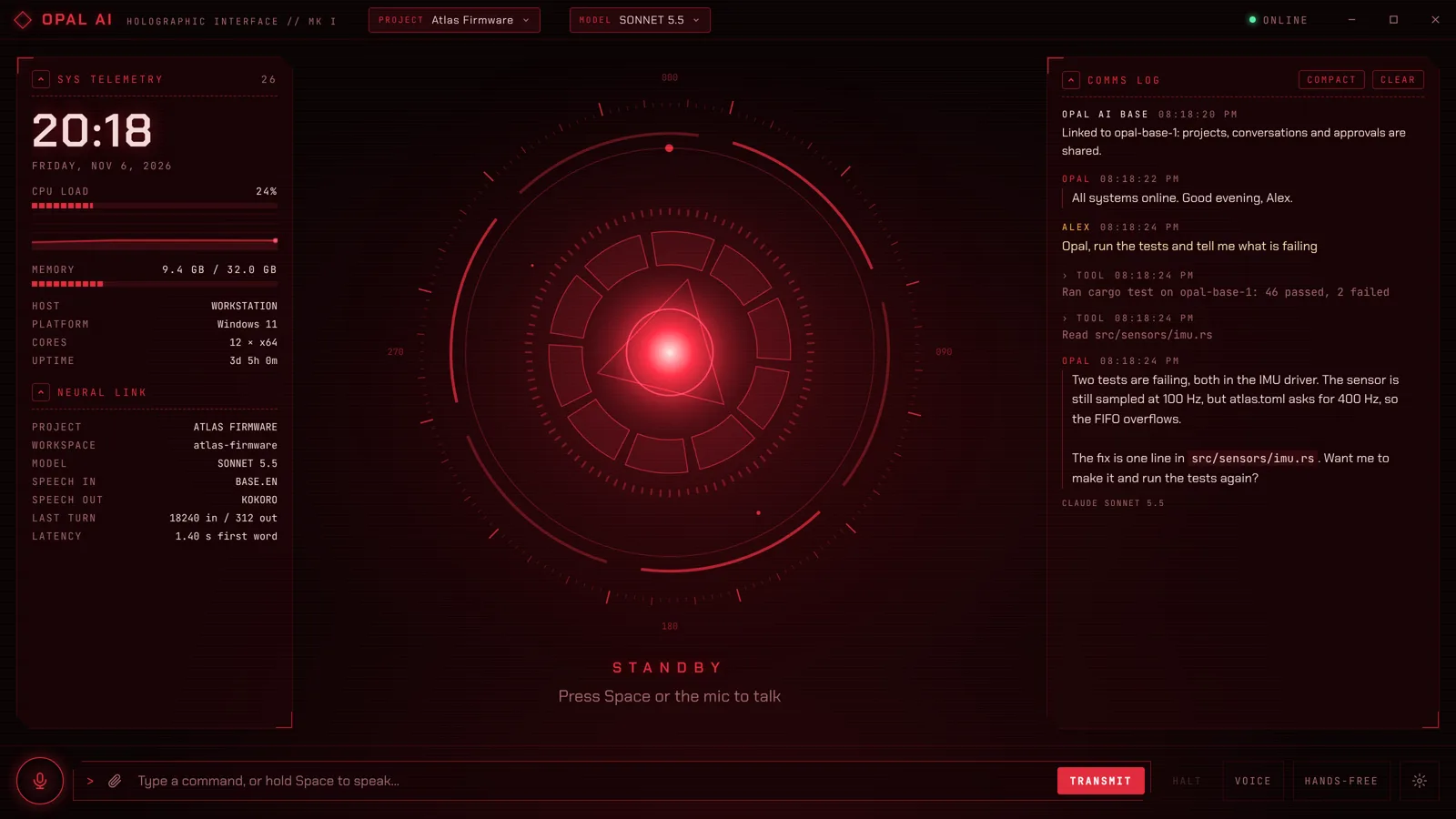
Opal Ai on Windows: the reactor core, live system telemetry and the comms log
Opal Ai on Windows: the reactor core, live system telemetry and the comms log.

Talk naturally

Wake word “Opal”, hands-free or push-to-talk; on-device speech recognition.

A voice with presence

Film-style neural voices that speak while the reply is still being written.

Real work, not just chat

Files, builds, tests, git, SSH, web, pictures, video and audio.

You stay in control

Every change shown first; nothing happens until you approve.

One Opal, every device

Opal Ai Base links phones, tablets and computers, live.

Choose your AI

Claude, your own local models on Ollama, or Hermes Agent, switchable by voice.

The product family

ProductWhat it isRuns on
Opal Ai (desktop)The app you talk to: holographic HUD, voice in and out, projects, files, commands, approvals.Windows, macOS, Linux
Opal Ai for iPhone and iPadNative app with the same HUD and voice loop; full screen on the iPad. Links to the desktop or the Base, or works on its own.iOS / iPadOS 17 or later
Opal Ai BaseAlways-on server and web console that links all devices; runs requests, MCP servers, backups and monitoring.Windows, macOS, Linux (x64 and ARM64, including Raspberry Pi)

Who it’s for

IT professionals and network engineers

Work on servers, Raspberry Pis and build machines by voice, with every command shown before it runs.

Developers

Projects linked to real repositories: builds, tests, git, documentation and code review, hands-free.

Small businesses and professional firms

One private assistant across the office’s computers and phones, on hardware you own, with your own AI account.

Makers and power users

A sci-fi-grade interface that is genuinely useful, on a Raspberry Pi or a desktop.

Features

Voice and interface

  • Holographic HUD: an animated reactor core that reacts to your voice and to Opal’s own speech, live CPU and memory telemetry, a comms log and a command line.
  • Wake word “Opal”, hands-free listening, or push-to-talk (hold Space). Global hotkey Ctrl+Shift+J (Cmd+Shift+J on Mac).
  • On-device speech recognition (Whisper): your voice becomes text on your own device. Opal can learn how you say her name.
  • Natural follow-ups: no wake word needed for 8 seconds after a reply. Long requests are joined into one.
  • Interrupt any time: start talking, press HALT or Esc.
  • Type instead whenever you prefer; anything to type or paste appears with a COPY button.

Voices

  • Kokoro (default, included): neural voices on your device, British male “George” by default plus other British and American voices.
  • ElevenLabs (your ElevenLabs plan): the most cinematic delivery, any ElevenLabs voice including custom ones.
  • System voices: the operating system’s own voices, used automatically as a fallback.
  • Optional holographic voice effect; replies are spoken sentence by sentence as they stream in.

AI engines: choose your brain

  • Claude (Anthropic): Haiku 5.5 (fastest), Sonnet 5.5 (default), Opus 5.5 (most capable), with your own API key and prompt caching.
  • Local models (Ollama): Qwen 3, Llama 3.1, gpt-oss, Mistral Small and more on your own server, with no per-use charges.
  • Hermes Agent (optional): Nous Research’s open-source agent with its own memory and skills, installed separately.
  • Switch from the MODEL menu or by voice (“Opal, switch to Hermes”). Every reply shows which model wrote it.

Projects

  • Separate projects, each with its own instructions, knowledge files, history and an optional linked folder.
  • Long conversations are compacted, not forgotten; Opal can look up exact earlier wording.
  • Import from Claude.ai Projects, and hand work back with an exported summary.
  • Switch projects by voice (“Opal, switch to the pi scanner project”).

Files, pictures, video and audio

  • Attach by paperclip, drag and drop or paste: PDFs, images, Word, Excel, PowerPoint, text and code. Up to 10 files and 16 MB per message.
  • Looks at pictures and watches video frame by frame, at a moment or across a range.
  • Listens to audio: format and tags, loudness and silences, a timed transcript, and a spectrogram.
  • Hands files over: scripts, configs, reports and build outputs arrive with a SAVE button.

Getting work done

  • Edits files in the project’s folder, shown as red/green before-and-after diffs.
  • Runs commands, builds and tests, and reports what failed.
  • Git: status, diffs, commits, branches, pull and push, with hardened read-only git.
  • SSH to remote Linux machines, with host keys verified before any password or key is sent.
  • Web search and page reading with sources listed; local-network addresses are refused.
  • Documentation skill: writes and updates a project’s README and docs from its code.

Connections

  • MCP servers: built-in catalog with GitHub, Cloudflare, Microsoft Learn, Notion, Linear, Kling AI, DevAssistant Studio, Brave Search, Playwright, Filesystem and Memory — or add any other.
  • Pop-up windows: tools with their own page open in a secure window to browse, upload and pick.
  • Skills in the standard Agent Skills format; Opal can find, write and install them, always shown for approval first.
  • Paid tools are guarded: any step that spends credits gets its own approval card.

Approvals and safety

  • Nothing changes until you approve it: diffs for edits, full text for new files, the exact command for anything to run.
  • Three levels: Careful, Balanced (default) and Trusting. Deletes, admin commands, installs, downloads and force-pushes always ask.
  • Enforced in the app’s code. Opal can only touch the active project’s folder; deletions go to the Recycle Bin or Trash.
  • HALT cancels everything at once and stops running commands.
  • Out-of-credits help: a window with a BUY CREDITS button that opens the right billing page.

Opal Ai for iPhone and iPad

  • Native SwiftUI app with the same red HUD and voice loop. Full screen on iPad; in landscape the reactor and comms log sit side by side.
  • Two modes, switched automatically: linked to the desktop app or an Opal Ai Base (at home or anywhere over Tailscale), or on its own with your Anthropic API key or Ollama server.
  • Approve from the phone: a change requested at the desk can be approved on the phone, and the other way round. Whoever answers first decides.
  • Pop-ups on the go: tool pages open full screen, links open in an in-app Safari sheet.
  • Pair in seconds by scanning a QR code from the Base’s console.
  • Private by design: no accounts with Intuos, no tracking, no analytics; keys stored in the iOS Keychain.

Opal Ai Base

Opal Ai Base is the optional always-on server. It runs quietly on a spare PC, a Mac mini or a Raspberry Pi and links every phone, tablet and computer you own into one Opal: the same projects, conversations and approvals, live on every device. It runs as a background system service with its own restricted account, starts with the machine, restarts itself if it stops, and is set up entirely from a web browser.
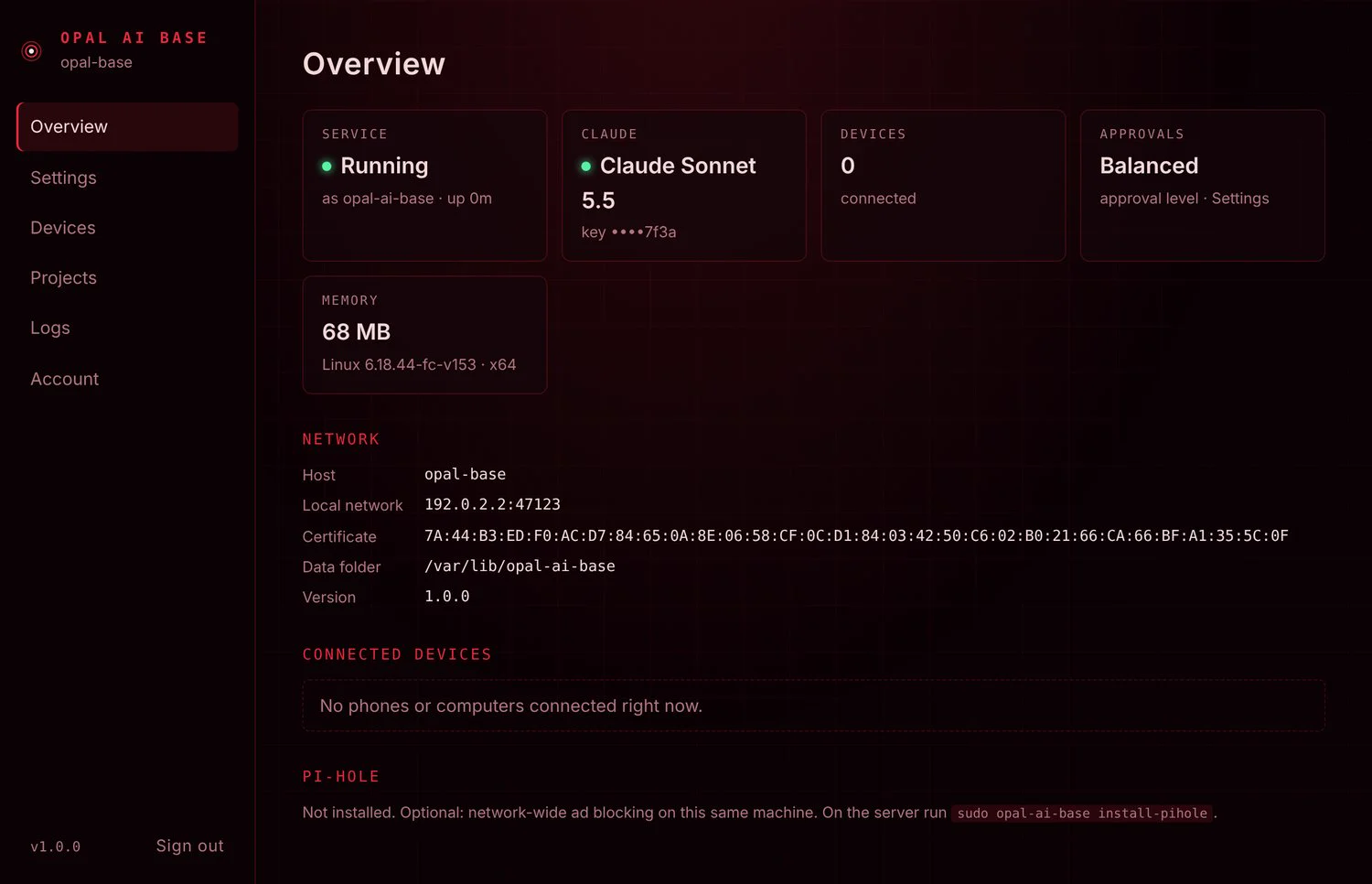
The Opal Ai Base web console: Overview
The Opal Ai Base web console: Overview.

One Opal across every device

  • Phones, tablets and computers share the same projects, conversations, approvals, SSH servers, skills and MCP servers, live.
  • Requests run on the Base, so builds, git and commands happen in its project folders, even from the phone.
  • Approval cards appear on every linked device; the first answer decides.
  • Away from home over Tailscale, with no ports opened to the internet.

Backup and restore

  • Everything in one file: settings, keys, pairing, SSH servers, skills, MCP servers, every project and its repository with full git history.
  • Small: maximum Brotli compression.
  • Optional encryption: AES-256-GCM with a passphrase-derived key (scrypt). Tampered or cut-off backups are refused.
  • To a download, USB drive or SD card, network share (SMB), SFTP server or any folder — every copy read back and checked.
  • Move to new hardware without re-pairing devices.

Security and administration

  • Its own service account on every OS; never runs as an administrator and can’t use sudo.
  • Pinned TLS links; install a certificate from your own certificate authority.
  • Console answers only to private networks and Tailscale, with 12-hour sign-ins and lockout after five wrong passwords.
  • Its own GitHub SSH identity; personal keys are never used.
  • Optional Pi-hole on the same Linux machine, installed by one command.
  • Prometheus metrics with a ready-made Grafana dashboard and alerts.

Web console

Overview
Service status, AI model, connected devices, memory, addresses, certificate; Pi-hole status if installed
Settings
AI key and model, local models (Ollama), Hermes Agent, web access, approval level, commands, Prometheus metrics
Devices
Pairing QR code and link, connected devices, server name, reset pairing
Certificate
The TLS certificate; install one from your own certificate authority
Projects
Each project’s folder and whether the service can reach it
GitHub
The service’s own SSH key for GitHub and other Git servers; repository checks
MCP servers
Add, sign in to and manage connected services for every device
Backup
Back up and restore everything, to USB, network storage, SFTP or a download
Logs, Account, About
Live service log; console password and restart; copyright and licences

System requirements

Minimum is the least the product runs on; recommended gives a smooth experience. Speech recognition and the neural voice run on the device you talk to, which is what drives the desktop figures.

Opal Ai on Windows, Mac and Linux

PlatformMinimumRecommended
Windows
  • Windows 10, 64-bit (x64)
  • 4-core processor
  • 4 GB RAM
  • 2 GB free disk space
  • Windows 11
  • 6 or more cores
  • 8 GB RAM
  • SSD
Mac
  • macOS 13 Ventura or later
  • Apple silicon or Intel
  • 4 GB RAM (8 GB on Intel)
  • 2 GB free disk space
  • Apple silicon
  • 8 GB RAM or more
Linux
  • 64-bit x64: Ubuntu 20.04, Debian 11, Fedora 39 or newer (.deb or .rpm)
  • PulseAudio or PipeWire sound
  • 4-core processor
  • 4 GB RAM
  • 2 GB free disk space
  • 6 or more cores
  • 8 GB RAM
  • SSD

All computers also need a microphone and speakers (a headset works best hands-free), an internet connection, and either an Anthropic API key, an Ollama server for local models, or a link to an Opal Ai Base. Disk space covers the app (about 500 MB) and its speech models (about 170 MB; the more accurate Whisper small.en adds 250 MB).

Opal Ai for iPhone and iPad

PlatformMinimumRecommended
iPhone
  • iOS 17 or later
  • iPhone XS / XR or newer
  • iPhone 12 or newer
iPad
  • iPadOS 17 or later
  • Any iPad that runs iPadOS 17
  • A recent iPad, used in landscape for the side-by-side HUD

Also needed: microphone and speech-recognition permission, an internet connection, and an Anthropic API key, an Ollama server, or a link to the Opal Ai desktop app or an Opal Ai Base.

Opal Ai Base

PlatformMinimumRecommended
Windows
  • Windows 10 or 11, 64-bit (x64), or Windows Server 2016 or newer
  • 2-core processor
  • 2 GB RAM
  • 1 GB free disk space
  • An always-on PC on wired Ethernet
  • 4 GB RAM
Mac
  • macOS 12 Monterey or later
  • Apple silicon or Intel
  • 2 GB RAM
  • 1 GB free disk space
  • Mac mini on wired Ethernet
Linux x64
  • 64-bit with glibc 2.28 or newer (Ubuntu 20.04+, Debian 10+, RHEL / Rocky 8+, Fedora 29+)
  • systemd
  • 1-core processor
  • 1 GB RAM
  • 1 GB free disk space
  • 2 or more cores
  • 2 GB RAM
  • SSD
Linux ARM64 / Raspberry Pi
  • Raspberry Pi 4 with 2 GB
  • 64-bit OS (Raspberry Pi OS 64-bit, Ubuntu 22.04+, Debian 11+)
  • 1 GB free disk space
  • Raspberry Pi 5 with 4–8 GB
  • NVMe or SSD instead of an SD card
  • Wired Ethernet

The server itself is light: about 90 MB of memory at rest and about 200 MB of disk. Every Base also needs to stay on and awake, a fixed address on the network (a DHCP reservation), internet access to the AI provider, TCP port 47123 reachable from your devices (local network or Tailscale), and administrator rights to install. 32-bit systems are not supported.

Opal Ai Base and Pi-hole on the same Linux machine

PlatformMinimumRecommended
Linux x64
  • A supported release of Debian, Ubuntu, Fedora or CentOS Stream (glibc 2.28+)
  • systemd
  • 2-core processor
  • 2 GB RAM
  • 4 GB free disk space
  • Wired Ethernet
  • 4 cores
  • 4 GB RAM
  • 8 GB free on an SSD
Linux ARM64 / Raspberry Pi
  • Raspberry Pi 4 with 2 GB
  • 64-bit Raspberry Pi OS, Ubuntu 22.04+, Debian 12 or Armbian
  • 4 GB free disk space (16 GB A2 card or larger)
  • Wired Ethernet, official power supply
  • Raspberry Pi 5 with 4–8 GB
  • System on NVMe or SSD
  • Pi-hole’s logs on a separate SD card
  • Wired Ethernet

Pi-hole also needs ports 53 (DNS) and 80/443 (its admin page) free, and no other DNS server on the machine.

Optional components

ComponentNeeded forRequirements
ffmpegVideo, animated GIFs, converting large or unusual pictures, and listening to audioOn the machine that runs requests (the Base, or a computer on its own)
Ollama serverLocal models instead of ClaudeOllama 0.14 or later; a model with tool support; 32,000-token context or more (64,000 for Hermes Agent); a GPU with enough memory for the model
Hermes AgentThe Hermes engineLinux (x64 or ARM64), macOS on Apple silicon, or Windows 10/11; about 2–3 GB of disk; a model provider account or an Ollama server
Node.js 20+ / uvMCP servers that run locally (npx, uvx)On the machine that runs the MCP servers
TailscaleUsing the Base away from homeOn the Base and each device

Technical specifications

Product data

Publisher
Intuos Communications LLC, Charlotte, North Carolina
Version
1.0
Languages
English (spoken and written)
Desktop technology
Electron 44 (Chromium 152), one codebase for Windows, macOS and Linux
Mobile technology
Native SwiftUI app for iPhone and iPad (universal)
Server technology
Self-contained service with its own Node.js runtime; nothing else to install
Licence
Proprietary, © 2026 Intuos Communications LLC; includes open-source components under their own licences

Voice and AI

Speech recognition
Whisper (tiny.en, base.en, small.en) on the device; one-time download of about 80 MB
Voices
Kokoro neural voices on the device (about 90 MB), ElevenLabs (cloud), or system voices
Wake word
“Opal” (and spellings learned from your voice)
Claude models
Haiku 5.5, Sonnet 5.5 (default), Opus 5.5; streamed, with prompt caching and conversation compaction
Local models
Any Ollama model; tools need tool support; pictures need a vision model
Hermes Agent
Connected through the Agent Client Protocol on the same machine; one session per project

Files and media

Documents
PDF; Word, Excel and PowerPoint (read as text); any text or code file — 10 files and 16 MB per message
Pictures
JPEG, PNG, GIF, WebP; TIFF, BMP, AVIF and HEIC converted — 5 MB per attached image, large pictures reduced automatically
Video
MP4, MOV, MKV, WebM, AVI and others — frames at a moment or across a range
Audio
MP3, WAV, M4A/AAC, FLAC, OGG/Opus, WMA, AIFF and more, plus the sound of a video — up to 10 minutes per listen
Files from Opal
Any file she writes or builds — downloads up to 16 MB

Network and security

Base port
TCP 47123 (web console and device link), TLS
Device link
TLS with the server certificate pinned by fingerprint or key; token authentication; lockout after repeated failures
Secrets
API keys, SSH passwords and keys encrypted with the OS keychain (Windows DPAPI, macOS Keychain, Linux libsecret, iOS Keychain); never sent to the AI
Backups
AES-256-GCM, scrypt key derivation, SHA-256 integrity check, Brotli compression
Remote access
Private networks and Tailscale only; nothing needs to be opened to the internet
Privacy
Opal Ai never signs in to Intuos and sends no telemetry or analytics to Intuos; your requests go only to the AI provider you choose

Delivery formats

ProductPlatformFormat
Opal AiWindows (x64)Installer (.exe) and portable .exe
Opal AimacOSDisk image (.dmg)
Opal AiLinux (x64).deb (Debian, Ubuntu) and .rpm (Fedora, RHEL)
Opal AiiPhone and iPadApp Store / TestFlight
Opal Ai BaseWindows / Windows Server (x64)Installer (.exe), runs as a Windows Service
Opal Ai BasemacOS (Apple silicon, Intel)Installer packages (.pkg), runs as a LaunchDaemon
Opal Ai BaseLinux (x64, ARM64).deb packages and .tar.gz, runs as a systemd service

What’s included

Included

  • Opal Ai for Windows, macOS and Linux (installers).
  • Opal Ai Base for Windows, macOS and Linux x64 / ARM64 (installers and packages).
  • Opal Ai for iPhone and iPad (App Store).
  • Manuals: User Guide, Administrator Guide, Hermes Agent Guide (PDF).
  • Built-in documentation skill, MCP catalog, ready-made Grafana dashboard and alerts.

You provide

  • An AI provider: an Anthropic API key (usage billed by Anthropic to you), or your own Ollama server for local models, or both.
  • A microphone and speakers or a headset.
  • For Opal Ai Base: an always-on computer that meets the requirements above.
  • Optional: an ElevenLabs plan, accounts with services you connect (GitHub, Notion, Kling AI, DevAssistant…), Hermes Agent and a model provider for it, Tailscale.

Running costs

  • Opal Ai does not include AI usage. Claude usage is billed by Anthropic to your own account; web searches are billed by Anthropic per search.
  • Local models on your own Ollama server have no per-use charge.
  • Optional services (ElevenLabs, Hermes Agent’s model provider, paid MCP services such as Kling AI or DevAssistant) are billed by those companies.

Runs on the CyberDeck